


v2RayTun
4.1284.00 Reviews
App Specs
- Version
- 5.23.74
- Updated On
- License
- Free
- Downloads
- 10,000,000+
- Developer
- DATABRIDGES TECHNOLOGIES LTD
- Categories
- Tools
- Platform
- Android
Screenshots
 Analysis by AppCompare
I find proxy clients most useful when I treat them as a connection tool, not a magic speed button. That distinction matters with v2RayTun: it can route traffic through a proxy configuration, but the result still depends on the connection and service you use. When the route is a good fit, it can make a blocked site reachable or give me a more consistent path on a difficult network; when the route is slow or overloaded, adding another hop can make things worse.
A practical routine for everyday use
My baseline workflow is simple: decide what I need the connection for, choose a suitable configuration, connect, then check the actual task rather than assuming the status indicator tells the whole story. A page that loads, a message that sends, or a short video that plays is a more useful test than repeatedly tapping connect. If the result is poor, I would first compare the same task with the proxy off, then try another available configuration instead of changing several settings at once.
That small habit makes troubleshooting much less frustrating. A slow website might be the proxy route, the local Wi-Fi, or the site itself. Changing one thing at a time helps me tell the difference. I also avoid leaving a proxy active by default when I no longer need it: this keeps my connection behavior predictable and makes it easier to notice when a particular app or site works differently through the route.
Where a proxy client fits—and where it does not
For a traveler using hotel Wi-Fi, a student trying to reach a service that is unavailable on a particular network, or someone who already has proxy access and wants a mobile client, this kind of tool has a clear purpose. It can be especially handy when I want one familiar place to manage the connection rather than manually adjusting network details elsewhere. A repeatable routine is useful too: connect before opening the relevant app, verify the result, and disconnect when the task is finished.
It is not the right answer to every network problem. If my home Wi-Fi is slow for every device, I would investigate the router or internet service before expecting a proxy to fix it. If I need a simple privacy product with a provider, server selection, and support all bundled together, a conventional VPN service may be easier to understand. A proxy client is a better fit when I know where my configuration comes from and want to use it; it is less suitable when I expect the app itself to supply a complete service without any setup or judgment on my part.
Small checks that save time
Before relying on a connection for an important call or a work task, I would test the exact app or website I plan to use. Some services behave differently when traffic is routed, and a successful connection in the client does not guarantee that every app will work as expected. For a useful comparison, try the same action both with and without the proxy, on the same network, and note which setup is more reliable. That is more informative than judging by a quick speed impression.
I would also keep configurations organized and change only what I understand. If a connection stops working after a network change, testing the existing setup again before editing it can prevent an unnecessary reset. When using public Wi-Fi, remember that a proxy route is only one part of staying safe: I still use secure websites, avoid sharing sensitive information on unfamiliar services, and keep my device’s software current. A proxy should not be treated as a guarantee of anonymity or as a substitute for careful browsing.
Worth Reading Before You Choose

EA SPORTS FC Mobile 26 Is a Bigger Football Game, but It Takes Time

Flipboard Shows What News Apps Must Do Beyond the Feed

Switching to Android Auto Means Rethinking Your Driving Routine

Google Calendar Makes a Crowded Week Easier to Manage

Ludo King Makes the Most of the Minutes Between Plans

Baby Panda World Brings Quick Play to Modern Phones, but Its Game Library Feels Busy
Who will get the most from it
The best match is someone comfortable following a few connection steps, who has a legitimate proxy configuration and a specific reason to route traffic. It is also approachable for a beginner who is willing to learn what the configuration does, but I would not recommend choosing random settings just to see whether the internet feels faster. People who want a fully managed, hands-off service may prefer a mainstream VPN app, while people whose main issue is weak signal will get more from fixing the underlying network.
Before installing, it helps to know the basic facts: this is a free tools app from DATABRIDGES TECHNOLOGIES LTD, rated for Everyone. It has a 4.1 average from around 25,000 ratings and more than 10 million installs. It was released on April 9, 2024, and version 5.23.74 requires Android 7.0 or later. Those figures show that it has found a broad audience, but popularity alone does not tell me whether a particular configuration is trustworthy or suitable; that judgment remains part of using a proxy client responsibly.
First Impressions
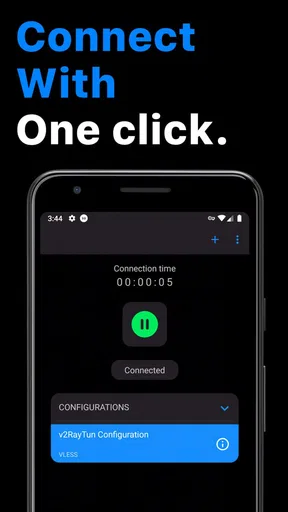
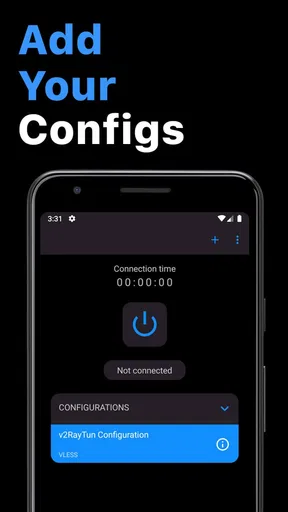
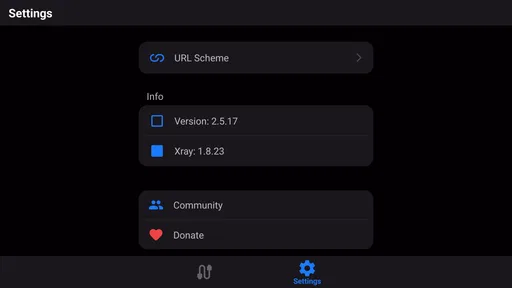
When I first opened v2RayTun, the interface struck me as clean and straightforward. No overwhelming buttons or confusing menus, just a sleek design that says, "Hey, I’m here to help you out." Honestly, the simplicity is refreshing in a world full of overly complicated apps.
The app promises to boost your internet speed and allow access to restricted websites. It’s designed to work seamlessly on both Android and iOS, making it a versatile choice for anyone looking to enhance their browsing experience. I would keep expectations grounded, though: routing can help with access in some situations, but it cannot guarantee faster service, and performance depends on the route and network in use.
Setting Up
Getting started with v2RayTun is a breeze. After downloading it from the app store, the setup wizard walks you through the initial steps. You don’t need to be a tech whiz to get it up and running. Just a few taps and you’re good to go.
One thing that stands out is the app's ability to automatically configure the best settings based on your network conditions. No more fiddling around trying to get the perfect setup. It’s like having a tech guru in your pocket. Even with an easy setup, I would still check what configuration is being used and where it came from, particularly before routing work or personal traffic.
Features Galore
Now, let’s talk features. v2RayTun offers a plethora of options that cater to different needs:
- Speed Enhancement: The app uses advanced protocols to ensure that your internet speed is optimized. Whether you’re streaming videos or gaming, you’ll notice a significant improvement.
- Security and Privacy: With today’s internet landscape, security is a top priority. This app encrypts your data, keeping your browsing safe from prying eyes.
- Access to Restricted Content: Say goodbye to geo-blocking. Whether you’re traveling or trying to access content from another region, v2RayTun has got you covered.
In practice, I would treat these as possible benefits rather than guarantees. A proxy can change how traffic is routed, but it does not automatically make every connection faster, protect every activity, or unlock every service. Access can depend on the configuration and the rules of the network or service involved. For anything sensitive, the quality and trustworthiness of the proxy source matter as much as the client you use to connect.
Performance & Usability
In terms of performance, I’ve got to say, I’m impressed. The app runs smoothly without draining your battery, a common issue with similar apps. I tested it on both my Android phone and iPad, and it worked flawlessly on both devices.
The app’s developers clearly prioritized user experience. The intuitive design means you don’t have to spend ages figuring out how to use it. Everything is where you’d expect it to be, which is a huge plus in my book.
For a realistic day-to-day example, imagine arriving at a café where a work page will not load on the guest network. I would connect using a configuration I already trust, open that page, and check whether the specific task works. If it does, I would finish the task and disconnect afterward. If it does not, I would compare the same page on mobile data or without the proxy rather than repeatedly switching settings. This keeps the client useful without turning a simple network issue into an afternoon of guesswork.
Making repeat use less fiddly
Experienced users can make the workflow faster through consistency rather than relying on undocumented shortcuts. Keep track of which configuration works for which network or purpose, and make one deliberate change at a time. If you are allowed to use the same trusted setup on both a phone and tablet, applying the same naming logic can make it easier to recognize the right entry later. Do not assume that identical-looking configurations will behave identically on different networks; confirm them where you intend to use them.
Another useful habit is to test before a time-sensitive situation. If you expect to join a meeting, open a work resource, or travel, check the connection while you still have time to troubleshoot. A proxy that is fine for reading a page may not be the best route for a live call, where delay and interruptions are more noticeable. For streaming or gaming, I would likewise judge the route by the actual service and session, not by a general claim that it improves speed.
When a route is unreliable, resist the urge to alter several options in one go. First confirm that the device still has ordinary internet access. Then test the proxy connection and the target service separately. If the ordinary connection is already failing, the proxy client is unlikely to solve the root cause. If only one site has trouble, the issue may be specific to that destination rather than a reason to rebuild every setting.
Limits worth keeping in view
A proxy client is not the same thing as a complete, hands-off VPN subscription. The distinction is practical: users generally need a configuration they can rely on, while a packaged VPN service is designed to present a more guided provider-and-server choice. Someone who does not know what proxy endpoint they are using, or why they should trust it, should pause before routing personal traffic. A clean interface makes operation easier; it does not settle the separate question of who operates the route.
There are also reasons not to route everything all the time. Some apps may refuse connections, behave differently, or perform worse through a proxy. A service may restrict access from certain routes, and a proxy cannot fix a weak signal, a congested local network, or an outage at the destination. If the direct connection is already reliable and your task does not need a proxy, leaving traffic alone is often the simpler choice.
People sometimes ask whether they can use a proxy to stay completely anonymous. I would not rely on that assumption. Routing changes the path your traffic takes, but it does not erase account activity, make careless browsing safe, or guarantee that the proxy operator cannot see relevant connection information. I would choose a reputable source, understand the configuration, and continue using normal security habits instead of treating any client as an invisibility switch.
It is also worth separating accessibility from permission. A route may make a page reachable from a particular network, but users should still follow applicable laws, workplace or school rules, and the terms of the service they are accessing. If your goal is only to improve weak home internet, compare the direct connection on another device and address the router or provider first. If you need a managed privacy product with a clear support channel, a mainstream VPN may be the more comfortable choice.
Final Thoughts
Overall, v2RayTun delivers on its promises. It’s a fantastic tool for anyone looking to enhance their internet experience. Whether you’re dealing with slow speeds, concerned about privacy, or just want to access more content, this app has something for you.
So, if you’re tired of buffering videos or restricted websites, give v2RayTun a try. It might just become your new favorite app. Trust me, once you try it, you won’t want to go back.
My recommendation is more specific: I would try it if I already have a trusted proxy configuration and want a straightforward mobile client to put it to use. I would skip it if I expect an app to provide a complete connection service without any decisions, or if my real problem is the underlying internet connection. Used with that distinction in mind, it can be a handy part of a repeatable routine rather than a cure-all.
Pros
- User-friendly interface for easy navigation.
- Supports multiple protocols for flexibility.
- High-speed connections with minimal lag.
- Strong encryption ensures privacy protection.
- Open-source
- allowing community contributions.
Cons
- Initial setup can be complex for beginners.
- Limited customer support for troubleshooting.
- Consumes significant battery on mobile devices.
- Occasional connection drops in some regions.
- Requires manual updates for new features.
FAQs for v2RayTun
What is v2RayTun, and how does it work?
v2RayTun is a mobile application designed to provide secure and private internet access by utilizing the V2Ray protocol. It works by redirecting your internet traffic through a series of encrypted servers, effectively masking your IP address and protecting your data from potential eavesdroppers. This makes it ideal for users seeking enhanced privacy and bypassing regional restrictions.
Is v2RayTun compatible with both Android and iOS devices?
Yes, v2RayTun is available for both Android and iOS platforms. Users can download the app from the Google Play Store for Android devices or the Apple App Store for iOS devices. Its cross-platform compatibility ensures a broad user base can benefit from its privacy and security features.
Does v2RayTun require any technical expertise to set up?
v2RayTun is designed with user-friendliness in mind, requiring no technical expertise for basic setup. The app comes with a simple interface that guides users through the configuration process. However, for advanced configurations, a basic understanding of network protocols may enhance the customization experience.
Are there any costs associated with using v2RayTun?
v2RayTun can be downloaded for free, but it may offer in-app purchases or subscription options for enhanced features or additional server access. These premium options can provide faster speeds or more server locations, making them a consideration for power users seeking optimal performance.
How does v2RayTun ensure user privacy and data security?
v2RayTun employs advanced encryption protocols that secure all user data transmitted through its servers. By masking your IP address and encrypting your internet traffic, the app ensures that sensitive information remains private and protected from potential cyber threats, making it a reliable choice for privacy-conscious individuals.


